Data output and loading
Output follows the xresloader_datablocks structure in pb_header_v3.proto:
Conversion and binary-loading examples: https://github.com/xresloader/xresloader/tree/main/sample
Text and Msgpack loading examples: https://github.com/xresloader/xresloader/tree/main/loader-binding
Output types
The core engine exports Excel into several formats. Choose one or more for your application; a web administration tool may use XML or JavaScript, for example.
Protocol binary data (recommended)
Use -t bin. This recommended format serializes xresloader_datablocks as compact protobuf binary data. Environments with protobuf support can read it.
Each data_block corresponds to an Excel record and contains that record serialized with your specified message type.
JSON, XML, Lua or JavaScript text (optional)
Use -t json, -t xml, -t lua or -t js. Output also contains a header and data body.
JSON layout:
[

    {

    "count": "(number) record count",

    "xres_ver":"xresloader version",

    "hash_code":"algorithm:hash",

    "data_ver":"data version"

    }, {

        "message_name":[

            {"Excel_field_key": "Excel cell value"},

            {"one_record_per_row": "record values..."}

        ]

    },

    "message_name"

]
XML layout:
<?xml version="1.0" encoding="UTF-8"?>

<root>

  <!--this file is generated by xresloader, please don't edit it.-->

  <header>

    <xres_ver>xresloader version</xres_ver>

    <hash_code>no hash for text output</hash_code>

    <data_ver>data version</data_ver>

    <count>record count</count>

  </header>

  <body>

    <message_name>One record per row

      <Excel_field_key>Excel cell value</Excel_field_key>

    </message_name>

  </body>

  <data_message_type>message_name</data_message_type>

</root>
Lua and JavaScript layouts depend on the output options. One Lua layout is:
-- this file is generated by xresloader, please don't edit it.

return {

    [1] = {

        xres_ver    = "xresloader version",

        hash_code   = "algorithm:hash",

        data_ver    = "data version",

        count      = 0, -- Record count

    },

    [2] = "message_name",

    ["message_name"] = {

        { ["Excel_field_key"] = "Excel cell value" }, -- One record per row

    }

}
Text output is compact by default. Use --pretty INDENT to set indentation.
Default Lua output is readable with standard Lua dofile / require; records are under the returned table's message-name key. See Native Lua loading for runnable conversion, indexing, caching and reload examples.
Msgpack binary data (optional)
Use -t msgpack for compact binary output with Msgpack libraries. The data structure is:
{

    header : {

        xres_ver: "version string",

        data_ver: "version string",

        count: number_of_records,

        hash_code: "algorithm:hash",

    }

    data_block: [

        {record_values},

        {record_values},

        {record_values},

    ],

    data_message_type: "message_name"

}
The Msgpack bindings include Python 3 and Node.js examples. Check dependency versions and installation commands for your runtime.
UE CSV/JSON data and code (optional)
Since 2.20.0, generated UE code uses enum field types; enums beyond UENUM's uint8 range are not marked BlueprintType. Version 2.23.6 fixes key detection for an explicit Name field. Regenerate and check both code and data when upgrading.
Since 2.0.0, xresloader exports UE-compatible data with -t ue-csv or -t ue-json.
UE output also generates C++ loader classes. See mapping options for controls.
The flat model expands repeated and message fields into the output class; the nested model preserves the original structure. Compare CSV code and JSON code.
The output directory also receives UnreaImportSettings.json for UEEditor-Cmd import commands.
For a UE installation at $UNREAL_ENGINE_ROOT, a project at $UNREAL_PROJECT_DIR/ShootingGame.uproject and output at $XRESLOADER_OUTPUT_DIR, run:
java -client -jar xresloader.jar -t ue-json -o $XRESLOADER_OUTPUT_DIR -f sample-conf/kind.pb            \

    -m DataSource=role_tables.xlsx|upgrade_10001|3,1 -m ProtoName=role_upgrade_cfg                      \

    -m OutputFile=RoleUpgradeCfg.json -m KeyRow=2                                                       \

    -m UeCfg-CodeOutput=$UNREAL_PROJECT_DIR/Source/ShooterGame|Public/Config|Private/Config
This generates data and code. Schema changes may require regenerating project files and rebuilding the library. Then import resources with UE's command line (Win64 example); the editor can detect and refresh previously imported resources:
$UNREAL_ENGINE_ROOT/Engine/Binaries/Win64/UE4Editor-Cmd.exe $UNREAL_PROJECT_DIR/ShootingGame.uproject   \

    -run=ImportAssets -importsettings=$XRESLOADER_OUTPUT_DIR/UnreaImportSettings.json                   \

    -AllowCommandletRendering -nosourcecontrol
Expose the helper through a Blueprint interface:
URoleUpgradeCfgHelper* UMyBlueprintFunctionLibrary::GetRoleUpgradeCfg()

{

    UClass* clazz = URoleUpgradeCfgHelper::StaticClass();

    if (nullptr == clazz) {

        return nullptr;

    }

    return clazz->GetDefaultObject<URoleUpgradeCfgHelper>();

}
Then use it in Blueprints:
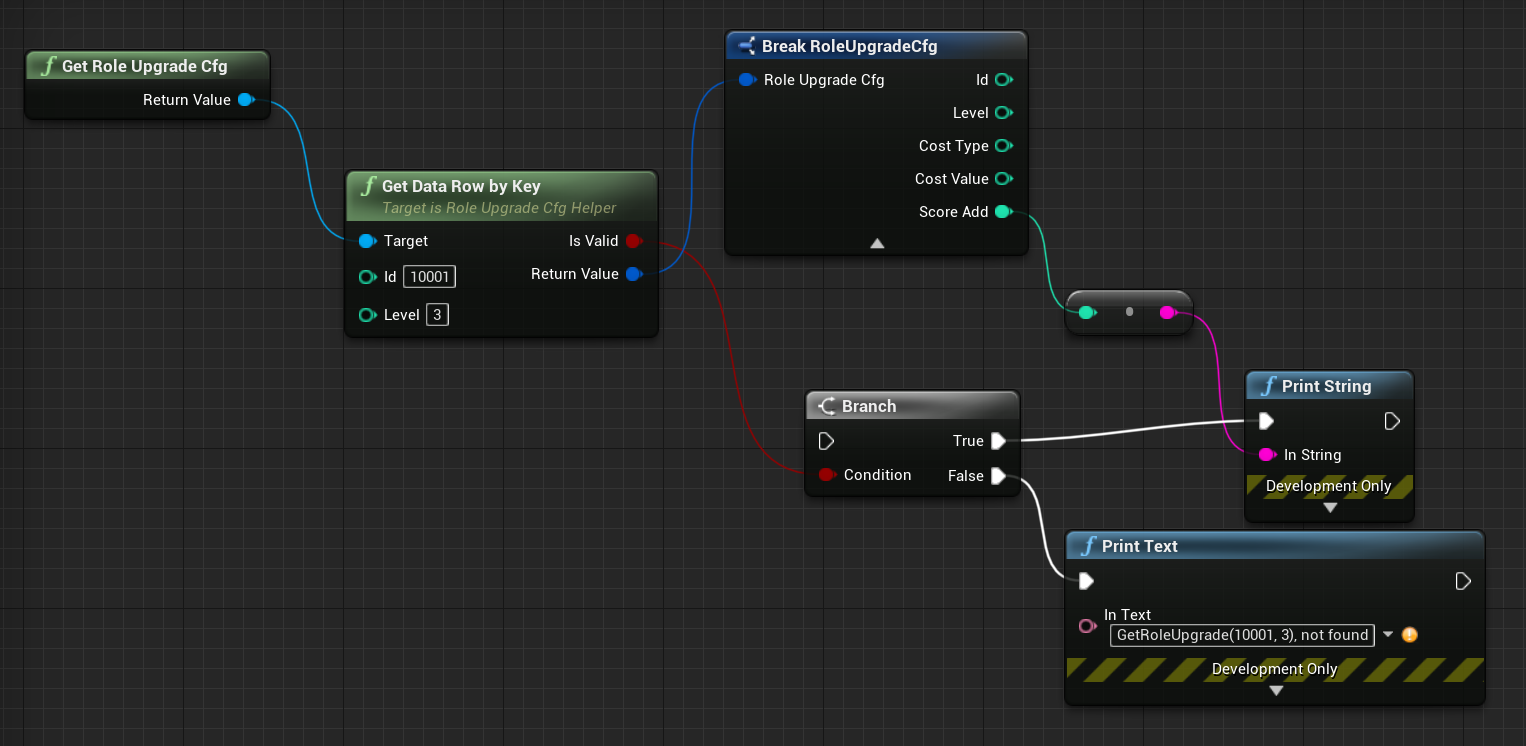
To reference UE assets from Excel, use org.xresloader.ue.ue_type_name and org.xresloader.ue.ue_type_is_class. The former produces TSoftObjectPtr<ue_type_name> for assets; the latter produces TSoftClassPtr<ue_type_name> for classes.
Example field:
message monster_role {

    option (org.xresloader.ue.helper)       = "helper";

    option (org.xresloader.msg_description) = "Monster configuration";

    int32  monster_id = 1  [ (org.xresloader.ue.key_tag) = 1 ];

    string pawn_class = 13 [ (org.xresloader.ue.ue_type_name) = "APawn", (org.xresloader.ue.ue_type_is_class) = true, (org.xresloader.field_description) = "Robot Pawn class" ]; // Default Blueprint class

}
The Excel values can be:
| Monster ID | Default Blueprint class |
|---|---|
| Monster ID | Default Blueprint class |
| monster_id | pawn_class |
| 2001 | Blueprint'/Game/Blueprints/Pawns/BotPawnDemo.BotPawnDemo_C' |
| 2002 | Blueprint'/Game/Blueprints/Pawns/BotPawnDemo_range.BotPawnDemo_range_C' |
| 2003 | Blueprint'/Game/Blueprints/Pawns/BotPawn_Melee.BotPawn_Melee_C' |
Export enums as code (optional)
Use -c with -t json, -t xml, -t lua, -t js, -t ue-csv or -t ue-json to export enum constants.
For example, export these enums from kind.proto to Lua:
import "xresloader.proto";

// Constant enum

enum game_const_config {

    option allow_alias = true;

    EN_GCC_UNKNOWN              = 0;

    EN_GCC_PERCENT_BASE         = 10000;

    EN_GCC_RANDOM_RANGE_UNIT    = 10;

    EN_GCC_RESOURCE_MAX_LIMIT   = 9999999;

    EN_GCC_LEVEL_LIMIT          = 999;

    EN_GCC_SOLDIER_TYPE_MASK    = 100;

    EN_GCC_ACTIVITY_TYPE_MASK   = 1000;

    EN_GCC_FORMULAR_TYPE_MASK   = 10;

    EN_GCC_SCREEN_WIDTH         = 1136;

    EN_GCC_SCREEN_HEIGHT        = 640;

    EN_GCC_CAMERA_OFFSET        = 268;

}

// Currency enum

enum cost_type {

    EN_CT_UNKNOWN              = 0;

    EN_CT_MONEY                = 10001 [(org.xresloader.enum_alias) = "Gold"];

    EN_CT_DIAMOND              = 10101 [(org.xresloader.enum_alias) = "Diamond"];

}

// This message illustrates descriptor export below; it is not needed for enum export.

message role_upgrade_cfg {

    option (org.xresloader.ue.helper)       = "helper";

    option (org.xresloader.msg_description) = "Test role_upgrade_cfg with multi keys";

    uint32 Id        = 1 [ (org.xresloader.ue.key_tag) = 1000 ];

    uint32 Level     = 2 [ (org.xresloader.ue.key_tag) = 1 ];

    uint32 CostType  = 3 [ (org.xresloader.validator) = "cost_type", (org.xresloader.field_description) = "Refer to cost_type" ];

    int32  CostValue = 4;

    int32  ScoreAdd  = 5;

}
Standard Lua output:
-- this file is generated by xresloader, please don't edit it.

local const_res = {

  game_const_config = {

    EN_GCC_SCREEN_WIDTH = 1136,

    EN_GCC_SCREEN_HEIGHT = 640,

    EN_GCC_UNKNOWN = 0,

    EN_GCC_CAMERA_OFFSET = 268,

    EN_GCC_FORMULAR_TYPE_MASK = 10,

    EN_GCC_LEVEL_LIMIT = 999,

    EN_GCC_RESOURCE_MAX_LIMIT = 9999999,

    EN_GCC_SOLDIER_TYPE_MASK = 100,

    EN_GCC_PERCENT_BASE = 10000,

    EN_GCC_RANDOM_RANGE_UNIT = 10,

    EN_GCC_ACTIVITY_TYPE_MASK = 1000,

  },

  cost_type = {

    EN_CT_DIAMOND = 10101,

    EN_CT_MONEY = 10001,

    EN_CT_UNKNOWN = 0,

  },

}

return const_res
Some environments, including older Unity integrations, expect Lua 5.1 module loading. Use --lua-module ProtoEnums.Kind to produce:
module("ProtoEnums.Kind", package.seeall)

-- this file is generated by xresloader, please don't edit it.

local const_res = {

  game_const_config = {

    EN_GCC_SCREEN_WIDTH = 1136,

    EN_GCC_SCREEN_HEIGHT = 640,

    EN_GCC_UNKNOWN = 0,

    EN_GCC_CAMERA_OFFSET = 268,

    EN_GCC_FORMULAR_TYPE_MASK = 10,

    EN_GCC_LEVEL_LIMIT = 999,

    EN_GCC_RESOURCE_MAX_LIMIT = 9999999,

    EN_GCC_SOLDIER_TYPE_MASK = 100,

    EN_GCC_PERCENT_BASE = 10000,

    EN_GCC_RANDOM_RANGE_UNIT = 10,

    EN_GCC_ACTIVITY_TYPE_MASK = 1000,

  },

  cost_type = {

    EN_CT_DIAMOND = 10101,

    EN_CT_MONEY = 10001,

    EN_CT_UNKNOWN = 0,

  },

}

game_const_config = const_res.game_const_config

cost_type = const_res.cost_type
Use --pretty INDENT to format generated code; these examples use --pretty 2.
Other languages and formats follow a similar structure; consult the actual generated output when loading.
Export protocol descriptors as code (optional)
Use -i with -t json, -t xml, -t lua, -t js, -t ue-csv or -t ue-json to export descriptors. The kind.proto shown above produces the following Lua output.
Standard Lua output:
-- this file is generated by xresloader, please don't edit it.

local const_res = {

  files = {

    {

      enum_type = {

        cost_type = {

          name = "cost_type",

          value = {

            EN_CT_DIAMOND = {

              name = "EN_CT_DIAMOND",

              number = 10101,

              options = {

                enum_alias = "Diamond",

              },

            },

            EN_CT_MONEY = {

              name = "EN_CT_MONEY",

              number = 10001,

              options = {

                enum_alias = "Gold",

              },

            },

          },

        },

        game_const_config = {

          name = "game_const_config",

          options = {

            allow_alias = true,

          },

        },

      },

      message_type = {

        role_upgrade_cfg = {

          field = {

            CostType = {

              name = "CostType",

              number = 3,

              options = {

                field_description = "Refer to cost_type",

                validator = "cost_type",

              },

              type_name = "UINT32",

            },

            Id = {

              name = "Id",

              number = 1,

              options = {

                key_tag = 1000,

              },

              type_name = "UINT32",

            },

            Level = {

              name = "Level",

              number = 2,

              options = {

                key_tag = 1,

              },

              type_name = "UINT32",

            },

          },

          name = "role_upgrade_cfg",

          options = {

            helper = "helper",

            msg_description = "Test role_upgrade_cfg with multi keys",

          },

        },

      },

      name = "kind.proto",

      package = "",

      path = "kind.proto",

    },

  },

}

return const_res
For Lua 5.1-style modules, use --lua-module ProtoOptions.Kind. Formatting uses --pretty INDENT (2 here). See the upstream sample files proto_v3/kind_option.js, kind_option.lua, kind_option.mod.lua and their proto_v2 equivalents for more examples.
Other languages and formats follow a similar structure; consult the generated files when loading.
Proto2 and proto3
The converter reads proto2/proto3 definitions from the descriptor. Packable numeric repeated fields default to packed=false in proto2 and packed=true in proto3. An explicit packed option fixes the encoding.
Packed encoding stores multiple values in one length-delimited field; the length is in bytes, not elements. A conforming parser accepts both packed and unpacked forms. If an old binding or custom parser supports only one, set packed explicitly and verify the runtime. See the official encoding guide.
These examples explicitly set packed=true in both syntaxes:
message arr_in_arr {

    optional string name = 1;

    repeated int32 int_arr = 2 [ packed = true ];

    repeated string str_arr = 3;

}
Or in proto3:
message arr_in_arr {

    string name = 1;

    repeated int32 int_arr = 2 [ packed = true ];

    repeated string str_arr = 3;

}
Loading data
The structures above explain how output is organized. The following libraries and examples cover several environments.
Method 1 (recommended): Generate C++/Lua/C#/Upb Lua/UE Blueprint readers
For C++, Lua and C#, use xres-code-generator to generate readers.
It can also generate C++ interfaces and Blueprint wrappers through template/UE* templates. Generated readers support multiple versions and complex multi-level or multiple indices.
Method 2: C++ binary loading
This requires the binary output described above.
See Loading with libresloader. This method also supports protobuf lite mode.
Method 3: lua-pbc binary loading
This requires binary output.
Projects using Lua can load protobuf with pbc. The pbc binding wraps a manager; Lua utilities wrap multiple datasets. Both depend on the utility layer in xresloader-utils/lua.
Loader example:
-- Load Lua utilities

local class = require('utils.class')

local loader = require('utils.loader')

-- Ensure pbc is already loaded

local pbc = protobuf

pbc.register(io.open('pb_header.pb', 'rb'):read('a'))   -- Register the container descriptor

pbc.register(io.open('user_protocol.pb', 'rb'):read('a')) -- Register the application descriptor

local cfg = loader.load('data.pbc_config_data_set')

-- The path rule must contain one %s

-- A requested message PROTO resolves as string.format(rule, PROTO)

-- For a protobuf package called config, use config.%s

cfg:set_path_rule('%s')

-- Set the configuration list module

-- cfg:set_list('data.conf_list') -- cfg:reload() clears data, then requires data.conf_list
Configuration list example (data/conf_list.lua):
local class = require('utils.class')

local loader = require('utils.loader')

local cfg = loader.load('data.pbc_config_data_set')

-- The second argument returns a key to organize role_cfg as key-value records

cfg:load_buffer_kv('role_cfg', io.open('role_cfg.bin', 'rb'):read('a'), function(k, v)

    return v.id or k

end)

-- The third argument supplies an alias

cfg:load_buffer_kv('role_cfg', io.open('role_cfg.bin', 'rb'):read('a'), function(k, v)

    return v.id or k

end, 'alias_name')

-- Read data after loading

-- The alias refers to the same data

vardump(cfg:get('role_cfg'):get(10002))     -- Dump role_cfg with id=10002

vardump(cfg:get('alias_name'):get(10002))   -- Dump the same record through the alias

-- Read individual fields

print(string.format('kind id=%d, name=%s, dep_test.name=%s', kind.id, kind.name, kind.dep_test.name))
For proto3 with the original pbc, explicitly set [packed=false] on numeric repeated fields: proto3 defaults to [packed=true], which that binding does not support.
Alternatively, use the modified pbc proto_v3 branch.
Main registration interfaces:
pbc_config_manager:load_buffer_kv(message_name, binary, function(index, record) return key end, alias) -- Key-value data
pbc_config_manager:load_buffer_kl(message_name, binary, function(index, record) return key end, alias) -- Key-list data
Method 4: C# with DynamicMessage-net
This requires binary output.
DynamicMessage-net offers dynamic type and configuration reading for Unity without reflection. It uses the lower-level protobuf-net interfaces; see its repository for details.
Method 5: Msgpack loading
This requires Msgpack output.
Msgpack libraries exist for many languages. See the Python and Node.js examples.
Method 6: JavaScript loading in Node.js
This requires JavaScript text output.
JavaScript output supports Node.js and AMD modes.
For example, load role_cfg.n.js from the upstream sample:
const role_cfg_block = require('./role_cfg.n');

const role_cfg_header = role_cfg_block.role_cfg_header; // Header metadata

const role_cfg = role_cfg_block.role_cfg;               // Array of records

// Read records

console.log(`we got ${role_cfg_header.count} rows, data version: ${role_cfg_header.data_ver}`);

for (const i in role_cfg) {

    if (role_cfg[i].id === 10001) {

        console.log('================= print data with id = 10001 =================');

        console.log(role_cfg[i]);

    }

}
See the JavaScript binding examples.
Method 7: Load generated enums in Lua
Maintain enum definitions in proto files and export them to your target language. For environments without native protobuf enums, xresloader also exports Lua, JavaScript, XML or JSON representations.
Load standard Lua enum output as follows:
local const_enum = require('kind_const')

print('game_const_config.EN_GCC_PERCENT_BASE = ' .. const_enum.game_const_config.EN_GCC_PERCENT_BASE)

function dump_all_enum (pv, ident)

    for k, v in pairs(pv) do

        if string.sub(k, 0, 1) ~= '_' and 'table' == type(v) then

            print(string.format('%s%s = {', ident, k))

            dump_all_enum(v, ident .. '  ')

            print(string.format('%s}', ident))

        else

            print(string.format('%s%s = %s,', ident, k, v))

        end

    end

end

dump_all_enum(const_enum, '')
For Lua 5.1 module output:
require('kind_const_module')

print('game_const_config.EN_GCC_PERCENT_BASE = ' .. ProtoEnums.Kind.game_const_config.EN_GCC_PERCENT_BASE)

function dump_all_enum (pv, ident)

    for k, v in pairs(pv) do

        if string.sub(k, 0, 1) ~= '_' and 'table' == type(v) then

            print(string.format('%s%s = {', ident, k))

            dump_all_enum(v, ident .. '  ')

            print(string.format('%s}', ident))

        else

            print(string.format('%s%s = %s,', ident, k, v))

        end

    end

end

dump_all_enum(ProtoEnums.Kind, '')
For other languages and formats, consult the generated output.