Data validators
Workbook and sheet names in the examples below are English illustrations; use matching names in your actual inputs. They are not additional files in the starter ZIP. The final error snapshot was captured from a real run with an invalid copy of the English starter workbook.
Overview
xresloader Protocol definitions support data validators. They check Excel input during conversion and identify out-of-range or unexpected configuration values.
Validator types include:
- Numeric ranges: restrict numeric values.
- Messages: accept defined protobuf field numbers or names.
- Enums: accept defined enum values.
- Functions: read allowed values from external sources.
- Logical combinations: combine rules into more complex constraints.
Applying validators
There are two ways to apply a validator.
Use @ in Excel
In KeyRow (the field-name row), append @
and a validator expression to a field name. Separate validators with |
for OR semantics: any passing rule accepts the value.
| Character ID | Level | Currency type | Cost |
|---|---|---|---|
| Character ID | Level | Currency type | Cost |
| Id | Level | CostType | CostValue@0-1000|2000-3000 |
| 10001 | 1 | ||
| 10001 | 2 | 10001 | 50 |
Here, Cost uses the 0-1000|2000-3000 validator.
Values must fall within [0, 1000] or [2000, 3000];
otherwise conversion reports an error.
Use protobuf extensions
Set org.xresloader.validator
on a proto field to keep the rule with its schema,
making it easier to maintain.
message role_upgrade_cfg {
    uint32 Id        = 1;
    uint32 Level     = 2;
    int32  CostType  = 3 [(org.xresloader.validator) = "cost_type"];
    int64  CostValue = 4 [(org.xresloader.validator) = "custom_rule5"];
    int32  ScoreAdd  = 5;
}
Numeric range validators
Numeric ranges are the simplest and most common rules, restricting allowed numeric values.
Range syntax
| Syntax | Meaning | Example | Condition |
|---|---|---|---|
A-B | Closed interval [A, B] | 0-1000 | Value ≥ A and ≤ B |
>=A | At least A | >=100 | Value ≥ A |
<=A | At most A | <=9999 | Value ≤ A |
>A | Greater than A | >0 | Value > A |
<A | Less than A | <100 | Value < A |
A-B|C-D | OR of ranges | 0-100|200-300 | Value in either range |
Item ID ranges
Projects often assign different ID ranges to item types. Add a range validator to the Excel field name:
| Item ID | Item name | Item type |
|---|---|---|
| Item ID | Item name | Item type |
| item_id@1-99999|300000-399999 | name | type |
| 10001 | Gold | 1 |
| 300001 | Fried rice | 2 |
For reuse, define ranges in a custom validator file:
# validator.yaml
validator:
  - name: "ItemIdRange_Menu"
    description: "Recipe item IDs (300000-319999)"
    rules:
      - 300000-319999

  - name: "ItemIdRange_Character"
    description: "Character card IDs (2000000-2099999)"
    rules:
      - 2000000-2099999

  - name: "ItemIdRange_MallProduct"
    description: "Shop product IDs (9000000-9999999)"
    rules:
      - 9000000-9999999
Exclude particular values
Use Not and InValues to exclude values. For example, require a nonzero Id within the valid range:
# validator.yaml
validator:
  - name: "ValidIdRange"
    description: "Valid IDs excluding zero"
    mode: "and"
    rules:
      - 1-999999
      - Not(InValues(0))
Message validators
A protobuf message can serve as a validator. Excel accepts its defined field numbers or field names; conversion checks that the selected field exists in the message.
Skill attribute bonus example
Define unit attributes:
message unit_attribute {
    int32 hp    = 1;
    int32 mp    = 2;
    int32 power = 3;
}

message skill_effect {
    int32 id        = 1;
    int32 level     = 2;
    int32 func_type = 3;
    int32 attr_type = 4;
    int32 value     = 5;
}
Use @unit_attribute to restrict the Attribute column
to unit_attribute field numbers or names:
| Skill ID | Level | Function type | Attribute | Value |
|---|---|---|---|---|
| Skill ID | Level | Function type | Attribute | Value |
| id | level | func_type | attr_type@unit_attribute | value |
| 20001 | 1 | hp | 100 | |
| 20001 | 2 | 1001 | 1 | 200 |
| 20001 | 3 | 1002 | power | 50 |
The Attribute column accepts field names (hp, mp, power)
or numbers (1, 2, 3); output contains the corresponding field number.
An undefined value such as armor or 99
causes a conversion error.
Single protocol fields and enum values
Since 2.23.1, a single message field or enum value can be a validator, e.g. unit_attribute.hp accepts that field's number. It does not parse an entire message.
Version 2.23.5 fixes empty strings being treated as numeric candidates; 2.23.7 fixes string conversion when enum validators nest with InTableColumn. On upgrade, rerun alias, cross-sheet and combined rules and inspect final numbers, beyond checking successful rule loading.
Enum validators
A protobuf enum can serve as a validator.
Excel accepts its enum numbers
or names. With org.xresloader.enum_alias,
it also accepts aliases, including localized labels.
Currency cost example
enum cost_type {
    EN_CT_UNKNOWN = 0;
    EN_CT_MONEY   = 10001 [(org.xresloader.enum_alias) = "Gold"];
    EN_CT_DIAMOND = 10101 [(org.xresloader.enum_alias) = "Diamond"];
}
Use @cost_type in Excel:
| Character ID | Level | Currency type | Cost |
|---|---|---|---|
| Character ID | Level | Currency type | Cost |
| Id | Level | CostType@cost_type | CostValue |
| 10001 | 1 | EN_CT_MONEY | 10 |
| 10001 | 2 | Gold | 50 |
| 10001 | 3 | 10101 | 100 |
Enum name EN_CT_MONEY, alias Gold
and enum number 10101 are all valid inputs. Values outside the definition
cause an error.
Function validators
Functions read allowed values from external data or perform more complex validation.
InText: values from a text file
Read allowed values from a UTF-8 text file.
InText syntax
InText("filename"[, field_index[, "separator_regex"]])
Parameters:
- filename: UTF-8 text path, normally one value per line.
- field_index (optional): 1-based field after splitting the line.
- separator_regex (optional): regular expression used to split lines.
Allowed-value list
Suppose intext-validator.txt contains:
50001
50002
50003
50004
50005
50006
Reference it in a custom rule:
# validator.yaml
validator:
  - name: "custom_rule4"
    mode: "or"
    rules:
      - InText("intext-validator.txt")
A field using this validator only accepts
values from 50001 through 50006.
UE resource IDs
Store a UE-exported resource ID list in text to validate references from configuration:
# validator.yaml
validator:
  - name: "UESourceAbilitySet_ue_source_id"
    description: "UE AbilitySet resource validation"
    rules:
      - InText("UeSource_AbilitySet.txt", 3)
InText("UeSource_AbilitySet.txt", 3)
reads the third field on each line
after splitting with the default separator.
InTableColumn: values from an Excel column
Read allowed values from a column in a specified workbook and sheet. This is useful for cross-table references.
Form 1: explicit column number
InTableColumn("filename", "sheet", start_row, column)
Read nonempty values in the column, starting at the given row.
Form 2: locate the column by KeyRow
InTableColumn("filename", "sheet", start_row, KeyRow, KeyValue)
- Find the column matching KeyValue in KeyRow.
- Read nonempty values in that column from start_row onward.
- Added or removed columns then need no rule change.
User level validation
# validator.yaml
validator:
  - name: "ExcelUserLevel_level"
    description: "User.xlsx user level validation"
    rules:
      - >-
        InTableColumn("User.xlsx",
          "User levels", 3, 2, "level")
In User.xlsx, sheet User levels, find the column named level in row 2, then read nonempty values from row 3 onward.
Item IDs across multiple sheets
# validator.yaml
validator:
  - name: "ExcelItem_ALL_item_id"
    description: "Item.xlsx item ID validation"
    rules:
      - >-
        InTableColumn("Item.xlsx",
          "All items", 3, 2, "item_id")
      - >-
        InTableColumn("Item.xlsx",
          "Auxiliary items (unobtainable)", 3, 2, "item_id")
The default rules mode is or: a value is accepted if it occurs in the item_id column of All items or Auxiliary items (unobtainable). This suits data maintained across multiple sheets.
Skill IDs
# validator.yaml
validator:
  - name: "ExcelSkill_skill_id"
    description: "Skill.xlsx skill ID validation"
    rules:
      - >-
        InTableColumn("Skill.xlsx",
          "Skills", 3, 2, "skill_id")

  - name: "ExcelQuest_id"
    description: "Quest.xlsx quest ID validation"
    rules:
      - InTableColumn("Quest.xlsx", "Quest", 4, 3, "id")
Set start_row and KeyRow to match the actual workbook. A common layout has descriptions in row 1, keys in row 2 and data from row 3, so KeyRow is 2 and start_row is 3.
InMacroTable: aliases from Excel
Read alias mappings from a workbook sheet, similarly to global MacroSource, but scoped to individual fields. Requires >=2.20.0.
Explicit-column syntax
InMacroTable("filename", "sheet", start_row,
    key_column, value_column)
KeyRow syntax
InMacroTable("filename", "sheet", start_row,
    KeyRow, key_field_name, value_field_name)
InMacroTable example
An English equivalent of custom_rule6 in custom_validator.yaml is:
# validator.yaml
validator:
  - name: "custom_rule6"
    version: 6
    mode: "and"
    rules:
      - >-
        InMacroTable("example.xlsx",
          "field_alias_macro", 3, 2, "key", "value")
      - InValues(1234, 5678, "Monthly pass alias", "Annual pass alias")
This configuration:
- Reads field_alias_macro from example.xlsx, locating key and value columns in row 2 and reading mappings from row 3 onward.
- Requires the mapped result to be one of 1234, 5678, Monthly pass alias or Annual pass alias.
Corresponding proto:
message field_alias_message {
    int32 id    = 1;
    int32 value = 2 [(org.xresloader.validator) = "custom_rule6"];
}
Regex: regular expression matching
Check input against a regular expression. Requires >=2.21.0.
Regex syntax
Regex("regular_expression")
Email format
# validator.yaml
validator:
  - name: "ValidEmail"
    description: "Email format validation"
    rules:
      - >-
        Regex("^[a-zA-Z0-9._%+-]+@[a-zA-Z0-9.-]+\\.[a-zA-Z]{2,}$")
ID format
# validator.yaml
validator:
  - name: "ValidItemId"
    description: "Item ID must have 6–7 digits"
    rules:
      - Regex("^\\d{6,7}$")
Logical combinations
Combine child validators into complex rules. And/Or require >=2.21.0; Not/InValues require >=2.22.2.
And: all child rules
Every child validator must pass.
And(rule1, rule2, ...)
And example
# validator.yaml
validator:
  - name: "ExcelBuilding_building_id_range"
    description: >-
      Building Item.xlsx ID validation
      (must be a valid item in the building range)
    mode: "and"
    rules:
      - ExcelItem_ADDABLE_item_id
      - ExcelItemIdRange_Building
You can also use function syntax directly in an expression:
validator:
  - name: "CustomValidCostType"
    rules:
      - And(cost_type, Not(InValues(0, 1)))
Or: any child rule
Any passing child validator accepts the value. This is also the default rules-list behavior.
Or(rule1, rule2, ...)
Building IDs: kitchenware or furniture
# validator.yaml
validator:
  - name: "ExcelItemIdRange_Building"
    description: "Building item IDs (kitchenware or furniture)"
    mode: "or"
    rules:
      - ExcelItemIdRange_BuildingKitchenware
      - ExcelItemIdRange_BuildingFurniture
Combine both building-related ranges; an ID in either range is valid.
Cross-sheet references
# validator.yaml
validator:
  - name: "ExcelRandomPool_pool_id"
    description: "RandomPool.xlsx pool ID validation"
    mode: "or"
    rules:
      - >-
        InTableColumn("RandomPool.xlsx",
          "RandomPool", 3, 2, "pool_id")
      - >-
        InTableColumn("RandomPool.xlsx",
          "RandomPoolMerge", 3, 2, "pool_id")
Not: exclude child rules
No specified child validator may pass.
Not(rule1, rule2, ...)
Exclude particular values
# validator.yaml
validator:
  - name: "ExcelItem_ADDABLE_item_id"
    description: "Addable items excluding read-only and empty values"
    mode: "and"
    rules:
      # Must exist in the item table
      - >-
        InTableColumn("Item.xlsx",
          "All items", 3, 2, "item_id")
      - Not(InValues(0))
      - Not(ExcelItemIdRange_VirtualReadonly)
This combination requires:
- A value present in All items in Item.xlsx.
- A value other than 0, to catch omitted input.
- A value outside the read-only virtual-item range.
InValues: explicit candidates
The value must be one of the specified candidates.
InValues(value1, value2, ...)
Weekday values
# validator.yaml
validator:
  - name: "ExcelDayRange_Weekday"
    description: "Weekday (1–7)"
    rules:
      - InValues(1, 2, 3, 4, 5, 6, 7)
For consecutive integers, the range 1-7 has the same effect.
Selected enum values
# validator.yaml
validator:
  - name: "SpecificTypes"
    description: "Only these specific values"
    rules:
      - InValues(1001, 1002, 1003, "Special type A", "Special type B")
Custom validator files
Custom rules allow reuse of complex combinations.
Use --validator-rules to load
a YAML validator file.
Requires >=2.14.0-rc3.
File format
# validator.yaml
validator:
  - name: "validator_name"
    description: "Optional description"
    version: 0
    mode: or
    rules:
      - rule1
      - rule2
      - ...
Fields
| Field | Required | Meaning |
|---|---|---|
| name | Yes | Rule name referenced with @ or a proto extension. |
| description | No | Text shown in validation diagnostics. |
| version | No | Version for progressive validation (>=2.20.0). |
| mode | No | Combination mode (>=2.22.0), below. |
| rules | Yes | List of validation rules. |
Mode values:
- or (default): any rule may pass.
- and: all rules must pass.
- not: no rule may pass.
Function forms And(), Or(), Not() inside rules can express the same behavior.
Each rules entry may be:
- A range, e.g. 0-1000 or >=100.
- An enum/message name, e.g. cost_type or unit_attribute.
- A function, e.g. InText(...) or InTableColumn(...).
- Another custom rule, e.g. ExcelItem_ALL_item_id.
xresloader detects circular validator dependencies. To avoid repeated overhead, it checks when a validator is first used.
References and nesting
Custom validators may reference other custom validators at multiple levels, allowing complex rules to be reused.
Nested references
# validator.yaml
validator:
  # Base ranges
  - name: "ExcelItemIdRange_VirtualWritable"
    description: "Grantable virtual item IDs"
    rules:
      - 1000-7999

  - name: "ExcelItemIdRange_VirtualReadonly"
    description: "Read-only virtual item IDs"
    rules:
      - 8000-9999

  - name: "ExcelItemIdRange_BuildingKitchenware"
    description: "Kitchenware IDs"
    rules:
      - 500000-599999

  - name: "ExcelItemIdRange_BuildingFurniture"
    description: "Furniture IDs"
    rules:
      - 700000-749999

  # Building range: kitchenware OR furniture
  - name: "ExcelItemIdRange_Building"
    description: "Building item IDs"
    mode: "or"
    rules:
      - ExcelItemIdRange_BuildingKitchenware
      - ExcelItemIdRange_BuildingFurniture

  # All usable item ranges
  - name: "ExcelItemIdRange_ALL"
    description: "Usable item IDs"
    mode: "or"
    rules:
      - ExcelItemIdRange_VirtualWritable
      - ExcelItemIdRange_VirtualReadonly
      - ExcelItemIdRange_BuildingKitchenware
      - ExcelItemIdRange_BuildingFurniture
      # ... more ranges
Version and progressive validation
Since 2.20.0, custom validators support version.
Together with --data-validator-error-version,
this allows progressive enforcement:
- If a validator version is lower than the configured threshold, failure is an Error and blocks conversion.
- If its version is at least the threshold, failure is a Warning and conversion continues.
- With a threshold of 0, all validation failures are Errors.
This helps introduce new rules without immediately rejecting old data.
Progressive validation example
# validator.yaml
validator:
  - name: "old_rule"
    version: 3
    rules:
      - 0-9999

  - name: "new_strict_rule"
    version: 8
    rules:
      - 100-9999
With --data-validator-error-version 5:
- old_rule (version=3 < 5) fails with an Error; conversion stops.
- new_strict_rule (version=8 >= 5) fails with a Warning; conversion continues.
Validators in protobuf extensions
Besides @ in Excel, set rules in proto files to keep them tied to the schema and avoid losing validation through a mistyped Excel key.
org.xresloader.validator
A field validator has the same effect as @ after the field name.
message role_upgrade_cfg {
    uint32 Id        = 1 [(org.xresloader.validator) = "custom_rule3"];
    uint32 Level     = 2;
    int32  CostType  = 3 [
        (org.xresloader.validator) = "custom_rule1",
        (org.xresloader.field_description) = "Refer to cost_type"
    ];
    int64  CostValue = 4 [(org.xresloader.validator) = "custom_rule5"];
    int32  ScoreAdd  = 5;
}
org.xresloader.map_key_validator / map_value_validator
Map extensions validate keys and values separately. Game configuration often uses maps for item quantities or currency costs, where both sides need their own validity checks. Requires >=2.15.0.
Behavior
- map_key_validator checks each map key.
- map_value_validator checks each map value.
- Use either or both.
- Syntax matches ordinary validators, including ranges, enums and custom rule names.
Configuration
Add extensions to a proto map field:
message cfg {
    // Key must be a valid item ID
    // Value must be in 1-99999
    map<int32, int32> item_counts = 1 [
        (org.xresloader.map_key_validator) = "ExcelItem_ALL_item_id",
        (org.xresloader.map_value_validator) = "1-99999"
    ];
}
Custom rules
map_key_validator and map_value_validator support all validator types, including custom rules, numeric ranges and enum names:
message reward_cfg {
    // Key must be an addable nonzero item ID
    // Value must be a valid quantity
    map<int32, int32> rewards = 1 [
        (org.xresloader.map_key_validator) =
            "ExcelItem_ADDABLE_item_id",
        (org.xresloader.map_value_validator) = "1-99999"
    ];

    // An enum can also validate keys
    map<int32, string> type_names = 2 [
        (org.xresloader.map_key_validator) = "cost_type"
    ];
}
Excel example
For reward_cfg, configure map data as follows:
| ID | Reward.key | Reward.value | Reward.key | Reward.value |
|---|---|---|---|---|
| ID | Reward.key | Reward.value | Reward.key | Reward.value |
| id | rewards[0].key | rewards[0].value | rewards[1].key | rewards[1].value |
| 1 | 10001 | 100 | 10002 | 200 |
| 2 | Gold | 50 |
In this example:
- Item IDs in key columns must be addable, as checked by ExcelItem_ADDABLE_item_id.
- Quantities in value columns must be in 1-99999.
- Gold in the second data row is an item alias; the macro table converts it to a numeric ID.
Validators also work through @ in Excel. For example, rewards@ExcelItem_ADDABLE_item_id sets a validator on the map field, but map_key_validator and map_value_validator give separate, precise checks of keys and values.
Skip empty rows (field_not_null)
Excel maintenance can leave empty rows, for example after cell deletion leaves invisible styles or a blank row is accidentally formatted. These may otherwise become empty output records.
Use org.xresloader.field_not_null to filter them. With field_not_null = true, an empty mapped field in a source row causes the whole row to be omitted.
Requires >=2.14.0-rc2.
Configuration
On the field that must be nonempty, add
(org.xresloader.field_not_null) = true:
message level_up_cfg {
    uint32 id = 1 [
        (org.xresloader.field_not_null) = true
    ];
    uint32 level = 2;
}
Excel example
| Character ID | Level | Notes |
|---|---|---|
| Character ID | Level | Notes |
| id | level | |
| 10001 | 1 | |
| 2 | This row is skipped | |
| 10002 | 3 |
Here, id has field_not_null enabled.
- Row 3: id=10001 exists and is exported.
- Row 4: id is empty, so the row is skipped.
- Row 5: id=10002 exists and is exported.
Common uses
- Required keys: apply field_not_null to a primary key such as id or item_id to skip omitted entries and avoid empty records.
- Optional data: distinguish optional fields from keys required for a record, and control which rows are retained.
- Accidental formatting: filter empty rows without manually cleaning Excel styles.
For oneof fields, org.xresloader.oneof_not_null similarly skips rows with an empty mapped oneof.
Uniqueness checks (field_unique_tag)
Some field combinations must be unique, such as character ID plus level, to avoid ambiguous application behavior.
org.xresloader.field_unique_tag defines these constraints. Assign the same tag to participating fields; their values form a tuple checked for duplicates during conversion. Duplicates produce an Error and prevent output.
Requires >=2.14.0-rc2.
Configuration
Assign the same field_unique_tag to fields in a unique combination:
message level_up_cfg {
    uint32 id = 1 [
        (org.xresloader.field_unique_tag) = "id_level"
    ];
    uint32 level = 2 [
        (org.xresloader.field_unique_tag) = "id_level"
    ];
}
Here, id and level share the tag,
field_unique_tag = "id_level"。
so every (id, level) tuple must be unique.
Excel example
| Character ID | Level | Notes |
|---|---|---|
| Character ID | Level | Notes |
| id | level | |
| 10001 | 1 | |
| 10001 | 2 | |
| 10001 | 1 | Duplicate tuple |
Results:
- (10001, 1): first occurrence, accepted.
- (10001, 2): distinct, accepted.
- (10001, 1): duplicate of the first row, error.
More than two fields
Assign the same tag to additional fields:
message item_drop_cfg {
    uint32 server_id = 1 [
        (org.xresloader.field_unique_tag) = "item_group"
    ];
    uint32 item_type = 2 [
        (org.xresloader.field_unique_tag) = "item_group"
    ];
    uint32 item_id = 3 [
        (org.xresloader.field_unique_tag) = "item_group"
    ];
}
This defines a three-field uniqueness constraint: (server_id, item_type, item_id) must be unique.
Multiple constraints
A field can have multiple field_unique_tag values and participate in multiple groups:
message shop_cfg {
    uint32 shop_id = 1 [
        (org.xresloader.field_unique_tag) = "shop_id",
        (org.xresloader.field_unique_tag) = "shop_group"
    ];
    uint32 group_id = 2 [
        (org.xresloader.field_unique_tag) = "shop_group"
    ];
}
This defines two constraints:
- shop_id: shop_id itself must be unique.
- shop_group: shop_id + group_id must be unique.
Common uses
- Composite primary key: character ID plus level.
- Multi-field tuple: server ID, item type and item ID together must be unique.
- Duplicate input: detect and reject repeated configuration rows.
Validator command options
| Option | Meaning | Notes |
|---|---|---|
| --validator-rules | File path | YAML custom rules. |
| --disable-data-validator | Ignore validation errors | Report warnings instead (>=2.17.0). |
| --data-validator-error-version | Enforcement threshold | Lower versions fail; others warn (>=2.20.0). |
Examples
# Custom validator file
java -jar xresloader.jar \
  --validator-rules validator.yaml \
  -t bin -p protobuf -f kind.pb \
  -m "DataSource=data.xlsx|sheet1|3,1" \
  -m ProtoName=role_cfg \
  -m OutputFile=role_cfg.bin \
  -m KeyRow=2
# Progressive validation
java -jar xresloader.jar \
  --validator-rules validator.yaml \
  --data-validator-error-version 5 \
  -t bin -p protobuf -f kind.pb ...
# Ignore errors (only for urgent recovery; discouraged)
java -jar xresloader.jar \
  --validator-rules validator.yaml \
  --disable-data-validator \
  -t bin -p protobuf -f kind.pb ...
In batch-tool XML configuration, such as xresconv-cli, put options under global:
<root>
    <global>
        <proto>protobuf</proto>
        <proto_file>../../Protocol/pb/Configure.pb</proto_file>
        <output_dir>../../Output/ConfigSet/</output_dir>
        <data_src_dir>./ExcelTables/</data_src_dir>
        <!-- Validator rules file -->
        <option>--validator-rules validator.yaml</option>
        <!-- Optional enforcement threshold -->
        <option>--data-validator-error-version 5</option>
    </global>
</root>
Practical combinations
The following patterns are useful in larger projects.
Case 1: item IDs with multiple constraints
A typical item system requires:
- The ID exists in the main Item.xlsx sheet.
- Each feature accepts a particular ID range.
- Some features exclude read-only or special items.
# validator.yaml
validator:
  # Base: items in the main or auxiliary sheet
  - name: "ExcelItem_ALL_item_id"
    description: "Item.xlsx IDs including auxiliary items"
    rules:
      - >-
        InTableColumn("Item.xlsx",
          "All items", 3, 2, "item_id")
      - >-
        InTableColumn("Item.xlsx",
          "Auxiliary items (unobtainable)", 3, 2, "item_id")

  # Addable items excluding read-only IDs and zero
  - name: "ExcelItem_ADDABLE_item_id"
    description: "Addable IDs excluding read-only and empty values"
    mode: "and"
    rules:
      - >-
        InTableColumn("Item.xlsx",
          "All items", 3, 2, "item_id")
      - Not(InValues(0))
      - Not(ExcelItemIdRange_VirtualReadonly)

  # Building items: addable and in the building range
  - name: "ExcelBuilding_building_id_range"
    description: "Building item ID validation"
    mode: "and"
    rules:
      - ExcelItem_ADDABLE_item_id
      - ExcelItemIdRange_Building

  # Recipe items: addable, in the recipe range,
  # and present in the recipe upgrade sheet
  - name: "ExcelMenu_menu_id_range"
    description: "Recipe item ID validation"
    mode: "and"
    rules:
      - ExcelItem_ADDABLE_item_id
      - ExcelItemIdRange_Menu
      - ExcelMenuUpgrade_menu_id
Case 2: references across multiple sheets
If one entity's data spans several sheets, combine InTableColumn rules:
# validator.yaml
validator:
  # Menu ID in regular or monster recipes
  - name: "ExcelMenu_menu_id_all"
    description: "Menu IDs (regular and monster recipes)"
    rules:
      - >-
        InTableColumn("Menu.xlsx",
          "Regular recipes", 3, 2, "menu_id")
      - >-
        InTableColumn("Menu.xlsx",
          "Monster recipes", 3, 2, "menu_id")

  # Shop product ID in purchase or exchange sheets
  - name: "ExcelMallProduct_product_id"
    description: "Shop product ID validation"
    rules:
      - >-
        InTableColumn("Mall.xlsx",
          "Shop products", 3, 2, "product_id")
      - >-
        InTableColumn("Mall.xlsx",
          "Shop products - exchange", 3, 2, "product_id")

  # Regular customer ID or monster-order customer group
  - name: >-
      ExcelCustomerExcelMonsterMenuCustomer_customer_id_customer_group
    description: "Customer ID or group validation"
    mode: "or"
    rules:
      - >-
        InTableColumn("Customer.xlsx",
          "Regular customers", 3, 2, "customer_id")
      - >-
        InTableColumn("Customer.xlsx",
          "Monster order customers", 3, 2, "customer_group")
Case 3: reject default values
Protobuf defaults such as integer 0 often mean unconfigured. Validate required fields to catch omitted values:
# validator.yaml
validator:
  # Nonzero lottery group ID present in its sheet
  - name: "ExcelLotteryPoolGroup_lottery_group_id"
    description: "Nonzero lottery group ID validation"
    mode: "and"
    rules:
      - Not(InValues(0))
      - >-
        InTableColumn("Lottery.xlsx",
          "Lottery pool groups", 3, 2, "lottery_pool_group_id")

  # Random pool element: special value 8003 or an addable item
  - name: "ExcelRandomPool_element_type_id"
    description: "Random pool element type validation"
    mode: "or"
    rules:
      - 8003
      - ExcelItem_ADDABLE_item_id
Case 4: a project-wide rule hierarchy
Build complex validators from base ranges through progressively composed rules:
# validator.yaml

# ===== Layer 1: base ID ranges =====
validator:
  - name: "ExcelItemIdRange_VirtualWritable"
    description: "Grantable virtual item IDs"
    rules:
      - 1000-7999

  - name: "ExcelItemIdRange_Menu"
    description: "Recipe item IDs"
    rules:
      - 300000-319999

  - name: "ExcelItemIdRange_Character"
    description: "Character card IDs"
    rules:
      - 2000000-2099999

  # ... more base ranges

# ===== Layer 2: combined ranges =====
  - name: "ExcelItemIdRange_ALL"
    description: "All usable item ID ranges"
    mode: "or"
    rules:
      - ExcelItemIdRange_VirtualWritable
      - ExcelItemIdRange_Menu
      - ExcelItemIdRange_Character
      # ... all base ranges

# ===== Layer 3: table membership =====
  - name: "ExcelItem_ALL_item_id"
    description: "IDs present in item sheets"
    rules:
      - >-
        InTableColumn("Item.xlsx",
          "All items", 3, 2, "item_id")
      - >-
        InTableColumn("Item.xlsx",
          "Auxiliary items (unobtainable)", 3, 2, "item_id")

  - name: "ExcelItem_ADDABLE_item_id"
    description: "Addable item IDs"
    mode: "and"
    rules:
      - >-
        InTableColumn("Item.xlsx",
          "All items", 3, 2, "item_id")
      - Not(InValues(0))
      - Not(ExcelItemIdRange_VirtualReadonly)

# ===== Layer 4: business rules =====
  - name: "ExcelBuilding_building_id_range"
    description: "Building item ID validation"
    mode: "and"
    rules:
      - ExcelItem_ADDABLE_item_id
      - ExcelItemIdRange_Building

  - name: "ExcelCharacter_character_id_range"
    description: "Character item ID validation"
    mode: "and"
    rules:
      - ExcelItem_ADDABLE_item_id
      - ExcelItemIdRange_Character
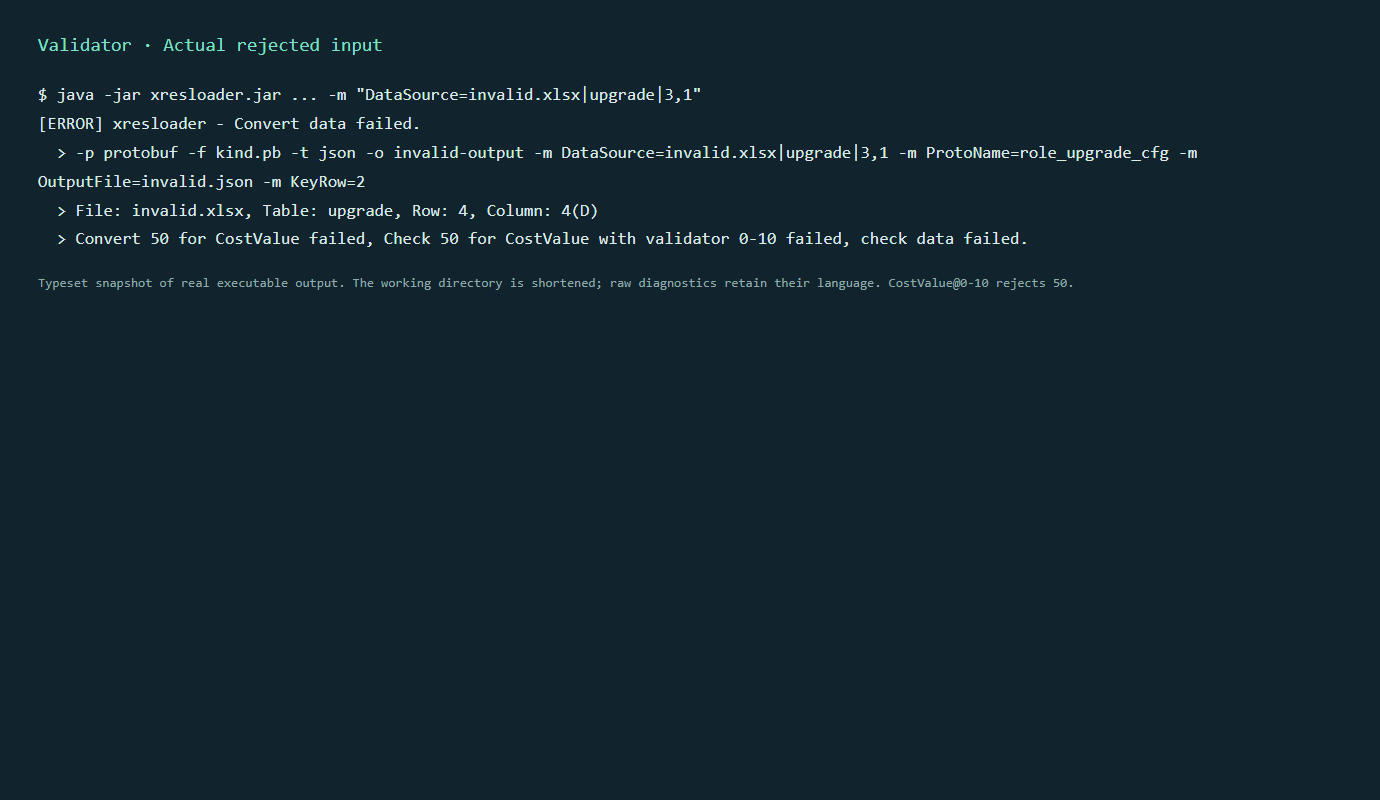
When a check fails, conversion reports details, including workbook, sheet, row, column and the failed rule. A real English-input failure is shown below: