Quick start
This guide covers conversion, data checks and loading with the prepared workbook, schema descriptor and XML manifest. The example uses xresloader 2.23.7, xresconv-cli 2.0.2 or xresconv-gui 3.0.0. Details are in the CLI, GUI and XML references.
1. Prepare tools and examples
- Install Java 17 or later and check
java -versionin a terminal. - Download the complete xresloader-version.jar from the latest engine release and rename it
xresloader.jar. You can also use latest downloads. - Download the English starter ZIP, extract it, and put the JAR in that directory.
- Choose the CLI or GUI from Download and install. Only one is needed. The CLI needs no Python; complete GUI packages bundle Node.js.
quick-start/
├── convert.xml       Batch conversion manifest
├── convert-lua.xml   Optional native Lua manifest
├── load-lua.lua      Native Lua loading example
├── xresloader.jar    Downloaded engine
├── tables.xlsx       Workbook with conversion-rule sheets
├── kind.pb           Prepared schema descriptor
└── output/           Generated bin and JSON files
The sample uses basic character data from xresloader and upgrade data from this site, with a simplified schema. Sources and attribution are retained. The sample includes a descriptor, so protoc is not required. English data names are translated while IDs and numeric values remain the same.
Open tables.xlsx to inspect the three characters in the kind sheet:
| Excel row | Character ID / id | Name / name |
|---|---|---|
| 3 | 10001 | Aurora |
| 4 | 10002 | Jack |
| 5 | 10003 | Kula |
In upgrade, row 1 describes columns, row 2 contains field names, and data begins on row 3:
| Excel row | Character ID / Id | Level | Currency / CostType | Cost / CostValue |
|---|---|---|---|---|
| 3 | 10001 | 1 | 0 | 0 |
| 4 | 10001 | 2 | 10001 | 50 |
| 5 | 10001 | 3 | 10001 | 100 |
Currency uses the upstream gold enum value 10001. scheme_kind and scheme_upgrade store conversion rules, rather than exported game data.
2. Check conversion settings
convert.xml exports both tables as bin and JSON. Relative paths use the configured working directory, which here is the XML directory.
<?xml version="1.0" encoding="UTF-8"?>
<root>
  <global>
    <work_dir>.</work_dir>
    <xresloader_path>xresloader.jar</xresloader_path>
    <proto>protobuf</proto>
    <proto_file>kind.pb</proto_file>
    <output_dir>output</output_dir>
    <output_type>bin</output_type>
    <output_type rename="/(?i)\.bin$/\.json/">json</output_type>
    <data_version>quick-start</data_version>
    <option>--pretty 2</option>
  </global>
  <list>
    <item file="tables.xlsx" scheme="scheme_kind" name="Character table" />
    <item file="tables.xlsx" scheme="scheme_upgrade" name="Upgrade table" />
  </list>
</root>
3. Run and inspect outputs
Using the GUI
Extract the complete GUI package and start xresconv-gui (xresconv-gui.exe on Windows). In Display settings, select English, then open convert.xml. Select Character table and Upgrade table, check Preview, then click Start conversion. The app preserves project names and raw converter diagnostics; the English ZIP supplies matching names and scripts.
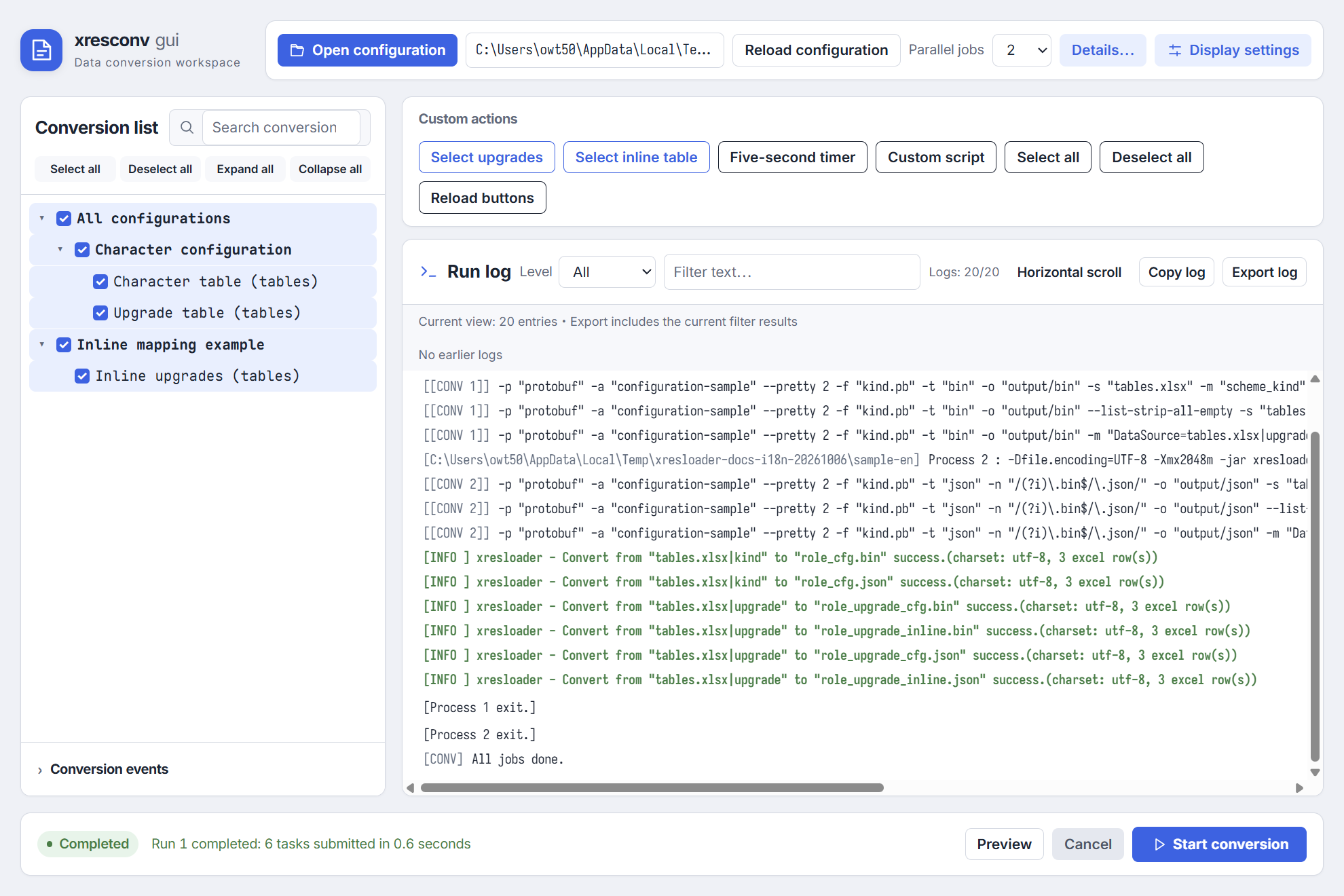
The screenshot uses the optional full sample.xml, which adds an inline entry to the two starter entries and produces six outputs. The basic convert.xml above produces four.
Using the CLI
Open a terminal in the example directory. In Windows PowerShell use ./xresconv-cli.exe, or xresconv-cli if it is on PATH:
xresconv-cli --test -p 1 convert.xml
xresconv-cli -p 1 convert.xml
The first command previews without producing files; the second converts. Check exit code 0, then inspect output/role_cfg.bin, output/role_cfg.json, output/role_upgrade_cfg.bin and output/role_upgrade_cfg.json. JSON is directly readable; bin is intended for loaders.
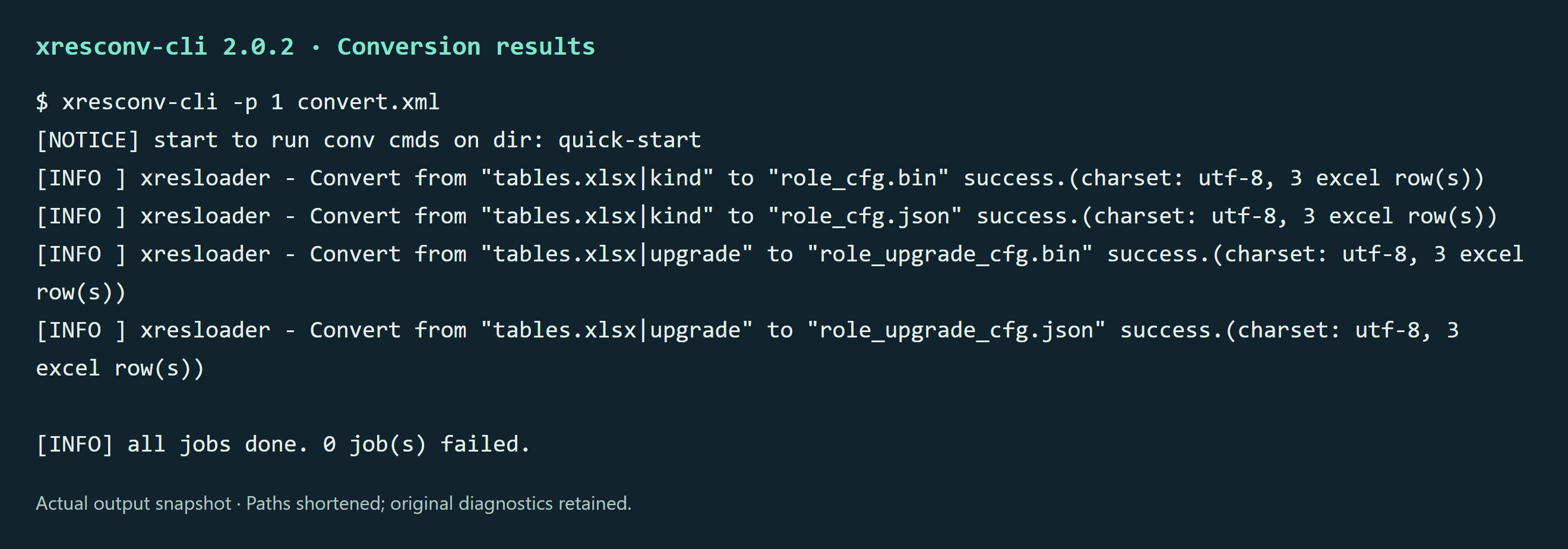
Click the image to view it at full size. Diagnostics retain the tool's original language.
CLI and engine diagnostics are English in these versions and have no locale option. The snapshot preserves actual output; only the working path is shortened.
4. Check and load data
Load JSON
Ordinary JSON contains [header, data, messageType]. The bundled load-json.cjs uses Node.js standard libraries to load upgrades and index them by character ID + level:
node load-json.cjs output/role_upgrade_cfg.json
const fs = require('node:fs');
const [header, data, messageType] = JSON.parse(
  fs.readFileSync('output/role_upgrade_cfg.json', 'utf8')
);
const rows = data[messageType];
const byKey = new Map(rows.map(row => [`${row.Id}:${row.Level}`, row]));
console.log(header.count);        // 3
console.log(byKey.get('10001:2')); // { Id: 10001, Level: 2, CostType: 10001, CostValue: 50 }
Node.js is a dependency of this loading example. Other languages can read the same JSON structure. Field casing follows the schema.
Load native Lua
With a Lua runtime, load exported tables directly. convert-lua.xml reuses the two inputs and changes only the format. Run in the sample directory, or open that manifest in the GUI and convert both selections:
xresconv-cli -p 1 convert-lua.xml
lua load-lua.lua output/role_upgrade_cfg.lua
The second command uses standard Lua 5.4 without an extra loading library. It prints version=quick-start, count=3 and Id=10001, Level=2, CostType=10001, CostValue=50. The core logic is:
local config = dofile("output/role_upgrade_cfg.lua")
local header, messageType = config[1], config[2]
local rows = config[messageType]
local byId = {}
for _, row in ipairs(rows) do
    byId[row.Id] = byId[row.Id] or {}
    byId[row.Id][row.Level] = row
end
print(header.count)                -- 3
print(byId[10001][2].CostValue)     -- 50
Lua [1] is the header, [2] is the message name, and records are in config[messageType]. Field casing follows the schema. The ZIP contains the full loader; see Native Lua loading for paths, require and reloads.
Inspect and load bin
Download xresloader-dump-bin from Downloads, then run:
xresloader-dump-bin --pretty -p kind.pb -b output/role_upgrade_cfg.bin
Check data count: 3, then IDs, currencies and costs for the three levels. dump-bin uses descriptor JSON field names; Id and Level retain their casing. proto3 zero defaults may be omitted. If RUST_LOG filters info, follow the inspector guide.
To load bin, first parse the xresloader_datablocks wrapper, then parse each data_block as role_upgrade_cfg. The entire bin is not one role_upgrade_cfg record.
- Use the loader generator for C++, C#, Go, Lua or UE loaders and indexes.
- Schema generation and complete loading examples retain custom schemas, manual C++ parsing and legacy libresloader templates and compilation commands. Editable loading sources are also in the ZIP.
Integrate project data
Write a .proto, generate a descriptor with imports using protoc, and set proto_file in XML. Match Excel field names to the schema. Use inline DataSource, ProtoName, OutputFile and KeyRow, or keep scheme sheets.
- Data mapping: sources, field rows and nested structures.
- Configuration and output matrices: multiple tables, formats, directories and tags.
- Output formats: bin wrappers and runtime integration.
- Loader generation: project loaders after your first conversion.
If conversion fails, first check Java, the JAR, the working directory and paths, then consult FAQ.