Batch conversion configuration
CLI 2.0.2 and GUI 3.0.0 use xresconv-conf. Manifests combine environment, formats and items; the GUI also handles categories, scripts and selectors. See Quick start, CLI and GUI.
Batch conversion with GUI and CLI
The CLI suits automation; the GUI suits interactive selection. Both call the JAR, but shared manifests do not make GUI events execute in the CLI.
Complete configuration example
<?xml version="1.0" encoding="UTF-8"?>
<!-- Optional: view XML with xresconv-conf/helper/view.xsl.
<?xml-stylesheet type="text/xsl" href="helper/view.xsl"?> -->
<root>
<!-- Optional include: relative to the declaring XML; do not include this file itself.
<include>shared.xml</include> -->
<global>
<work_dir desc="Main XML working directory for the shared manifest">.</work_dir>
<xresloader_path desc="Relative to work_dir; renamed complete JAR">xresloader.jar</xresloader_path>
<proto desc="Maps to -p">protobuf</proto>
<proto_file desc="Maps to -f; repeatable">kind.pb</proto_file>
<output_type desc="Maps to -t">bin</output_type>
<output_type rename="/(?i)\.bin$/\.json/" output_dir="output/json">json</output_type>
<!-- Optional UE output: the schema needs Name or key_tag, absent from the simplified starter schema.
<output_type class="client" rename="/(?i)\.bin$/\.csv/" output_dir="output/ue">ue-csv</output_type>
-->
<!-- Any class may match; if both class and tag are specified, both groups must match. -->
<output_dir desc="Relative to work_dir">output/bin</output_dir>
<data_src_dir desc="Find Excel in work_dir when empty"></data_src_dir>
<data_version desc="Generated automatically when empty">configuration-sample</data_version>
<rename desc="Local output_type.rename takes precedence over this global rule"></rename>
<java_option desc="Maximum heap 2 GB; before -jar">-Xmx2048m</java_option>
<!-- The old -client JVM mode is unnecessary with modern Java. -->
<default_scheme name="KeyRow" desc="Field row, starting at 1">2</default_scheme>
<!-- Optional: enable macros after copying the upstream workbook (original filename retained).
<default_scheme name="MacroSource">资源转换示例.xlsx|macro|2,1</default_scheme>
-->
<!-- Optional UE CSV wrapper; the correct name is UeCfg, not UeCg.
<default_scheme name="UeCfg-CsvObjectWrapper">{|}</default_scheme>
-->
<!-- Optional: enable custom validators after preparing the YAML.
<option>--validator-rules custom_validator.yaml</option>
-->
<option name="Pretty-print text">--pretty 2</option>
</global>
<groups desc="Optional group metadata">
<group id="client" name="Client" />
<group id="server" name="Server" />
</groups>
<category desc="Nested GUI categories">
<tree id="all_cats" name="All configurations"><tree id="kind" name="Character configuration" /></tree>
<tree id="test" name="Inline mapping example" />
</category>
<list>
<item file="tables.xlsx" scheme="scheme_kind" name="Character table" cat="kind" class="server" />
<item file="tables.xlsx" scheme="scheme_upgrade" name="Upgrade table" cat="kind" class="server">
<option name="Remove empty array entries">--list-strip-all-empty</option>
</item>
<item name="Inline upgrades" cat="test" class="client server" tag="public">
<scheme name="DataSource">tables.xlsx|upgrade|3,1</scheme>
<scheme name="ProtoName">role_upgrade_cfg</scheme>
<scheme name="OutputFile">role_upgrade_inline.bin</scheme>
</item>
<!-- Optional: enable nested arrays with the complete upstream workbook and proto_v3/kind.pb.
<item name="Nested array test" cat="test" class="client server">
<scheme name="DataSource">资源转换示例.xlsx|arr_in_arr|3,1</scheme>
<scheme name="ProtoName">arr_in_arr_cfg</scheme>
<scheme name="OutputFile">arr_in_arr_cfg.bin</scheme>
</item>
-->
</list>
<gui>
<set_name><![CDATA[
if (item_data.file) {
const base = item_data.file.replace(/^.*[\\/]/, "").replace(/\.[^.]+$/, "");
item_data.name += " (" + base + ")";
}
]]></set_name>
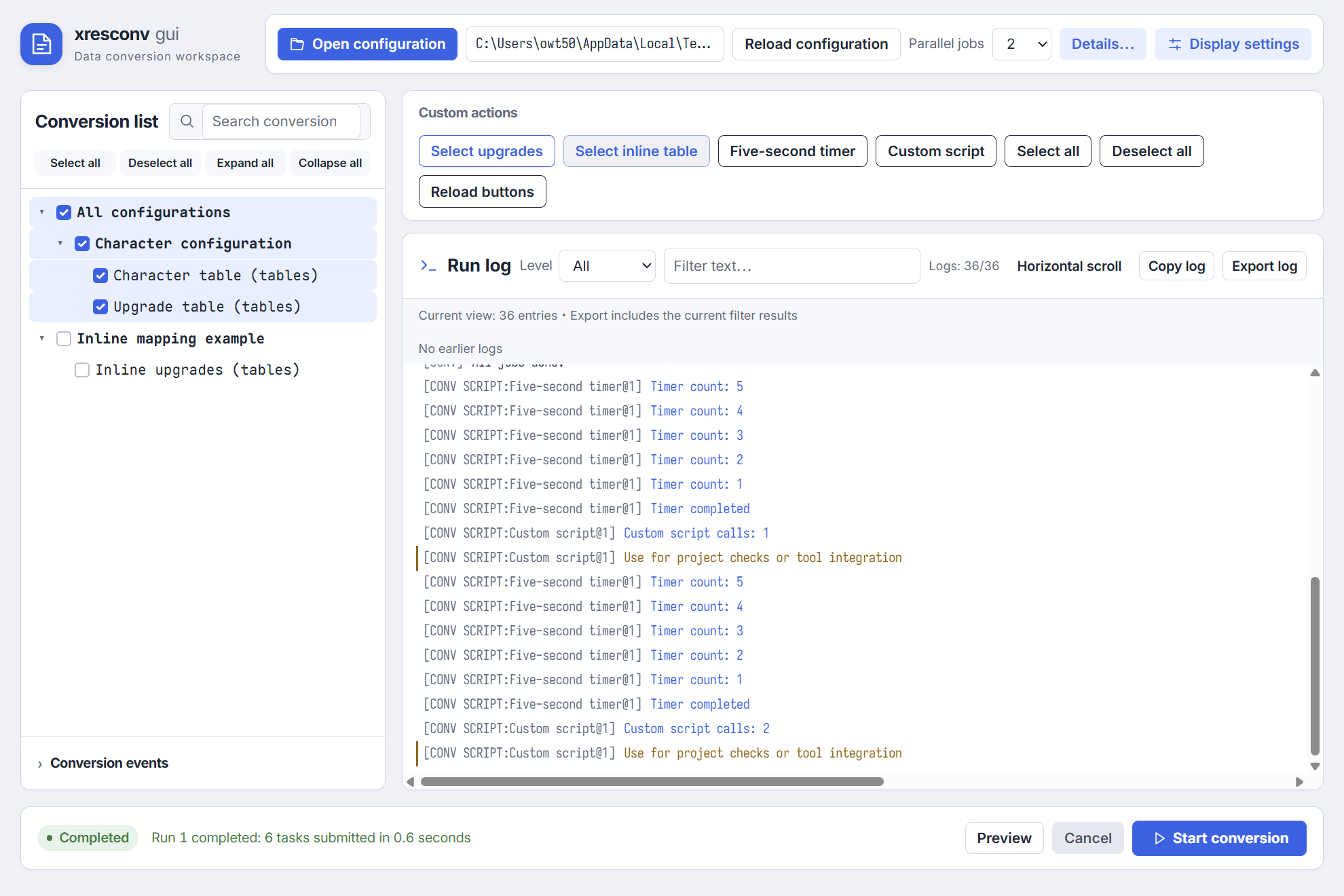
<on_before_convert name="Print working directory" type="text/javascript" timeout="15000"><![CDATA[
// Pass arguments separately without a shell. Hide subprocess windows on Windows.
const spawn = require("node:child_process").spawn;
const child = spawn(require("node:process").execPath,
["-e", "process.stdout.write(process.cwd())"],
{ cwd: work_dir, shell: false, windowsHide: true });
child.stdout.setEncoding("utf8");
child.stderr.setEncoding("utf8");
child.stdout.on("data", log_info);
child.stderr.on("data", log_error);
let finished = false;
function finish(reason) {
if (finished) return;
finished = true;
if (reason) reject(reason); else resolve();
}
child.on("error", error => finish(error.message));
child.on("close", code => finish(code === 0 ? null : "Subprocess failed: " + code));
]]></on_before_convert>
<on_after_convert name="After conversion" type="text/javascript" timeout="60000"><![CDATA[
alert_warning("Conversion events completed. Check results in the logs.");
resolve();
]]></on_after_convert>
<script name="delaycall" type="text/javascript" timeout="15000"><![CDATA[
if (data.running) {
reject("Previous invocation is still running");
} else {
data.running = true;
let left = 5;
function counter() {
if (left > 0) {
log_notice("Timer count: " + left--);
setTimeout(counter, 1000);
} else {
data.running = false; // Allow another click after completion.
log_notice("Timer completed");
resolve();
}
}
counter();
}
]]></script>
<script name="Custom script" type="text/javascript"><![CDATA[
data.call_times = (data.call_times || 0) + 1;
alert_warning("A custom script for a custom button");
log_notice("Custom script calls: " + data.call_times);
log_warning("Use for project checks or tool integration");
resolve();
]]></script>
</gui>
</root>
This example adapts xresconv-conf/sample.xml to the English starter data and can be saved and run directly. Optional macros, UE wrappers, validators and nested arrays remain commented out. Prepare referenced files and a matching complete descriptor before enabling them; optional historical workbook filenames remain literal. -client is an old JVM option, not a current conversion requirement.
file + scheme reads mapping rules from Excel sheets; the third item uses inline DataSource / ProtoName / OutputFile. The default creates six files: three items, each as bin / JSON. Optional UE CSV needs Name or key_tag; the full upstream nested-array schema provides extensions. See Mapping and Scripts.
Complete include example
This adapts sample_include.xml, overriding output types, directories and renaming while appending options. Outputs stay inside the sample directory:
<?xml version="1.0" encoding="UTF-8"?>
<root>
  <!-- Load sample.xml first, then apply this file; the working directory stays at the sample directory. -->
  <include>sample.xml</include>
  <global>
    <!-- This output_type group replaces the included group; only Lua is exported. -->
    <output_type desc="Maps to -t">lua</output_type>
    <output_dir desc="Relative to work_dir">output/lua</output_dir>
    <rename desc="Maps to -n">/(?i)\.bin$/\.lua/</rename>
    <option name="Pretty-print output">--pretty 2</option>
  </global>
</root>
xresconv-cli --test -p 1 sample.xml
xresconv-cli -p 1 sample.xml
xresconv-cli --test -p 1 sample_include.xml
xresconv-cli -p 1 sample_include.xml
The include redefines output_type as a group, producing only three Lua files rather than adding Lua to bin / JSON. Both XMLs, selectors and loaders are in the English ZIP. convert.xml remains the simple starter; use extensions as needed.
Configuration structure
| Location | Content |
|---|---|
root/include | Other XML files, relative to the declaring file |
root/global/work_dir | Backend working directory |
root/global/xresloader_path | JAR, relative to work_dir |
root/global/proto / proto_file | Protocol / descriptors; multiple proto_file entries |
root/global/data_src_dir | Data search directories; data_source_dir is an alias |
root/global/output_dir / rename | Global output directory / renaming |
root/global/output_type | Repeatable output matrix entry |
root/global/data_version | Data version in output header |
root/global/java_option | Repeatable JVM option, before -jar |
root/global/option | Repeatable xresloader argument fragment |
root/global/default_scheme | Default mappings keyed by name |
root/list/item | Conversion item: file+scheme or inline scheme |
root/list/item/scheme / option | Repeatable local mapping / extra arguments |
root/category/tree / groups/group | GUI category / group metadata |
root/gui | GUI events, named scripts and log hooks |
Use UTF-8 for shared configuration. Preserve the required casing of fields, tags and values. Unknown tags do not establish new features.
Path bases
| Path | CLI 2.x | GUI 3.0 |
|---|---|---|
| include | Declaring XML directory | Declaring XML directory |
| work_dir | Main XML directory | Directory of XML declaring work_dir |
| JAR, proto_file, data and output directories | Working directory | Working directory |
| XML / JSON startup arguments | Launch directory | Launch directory |
Without data search directories, Excel is found in work_dir. Prefer defining work_dir in the main shared manifest; for cross-directory reuse, inspect both previews. Paths do not all share the same XML-relative base.
Output matrices
<output_type>bin</output_type>
<output_type class="client" tag="public" output_dir="output/client"
             rename="/(?i)\.bin$/\.json/">json</output_type>
Tasks combine selected items with matching output_type entries. Per-format output_dir and rename take precedence over global settings.
Separate words within class or tag with spaces; any word in a group may match. With both class and tag, both groups must match. GUI items matching no output are unavailable. The CLI processes matching manifest items; the GUI additionally requires selection.
Give formats distinct suffixes or directories to avoid overwrites. rename uses /regex/replacement/; see Core options.
Merging and tool differences
Apply includes first, then the current file. Scalars overwrite in order; JVM options and option append. Multi-value groups such as output_type, proto_file and data_src_dir regroup by source file, rather than concatenating every array. Local schemes override same-name defaults while preserving supported repetitions.
The CLI uses the first nonempty global data_version, with -a taking precedence; the GUI updates in merge order. The CLI reapplies noncyclic duplicate includes, up to 128 levels. The GUI checks real paths for duplicates/cycles, limits depth to 64 and loading to 30 seconds. Failed GUI loads preserve the previous session.
Scripts, UI selections and edited GUI session settings do not automatically become CLI XML input. Persist shared settings into the project manifest and validate both tools.
CLI startup options
See CLI reference.
GUI startup options
See GUI reference.
GUI events
See Scripts for set_name, on_before_convert, on_after_convert and on_append_log contexts and completion.
Item naming: //root/gui/set_name
Modify item_data.name synchronously; require and asynchronous completion functions are unavailable.
Before and after conversion: //root/gui/on_before_convert and //root/gui/on_after_convert
Call resolve or reject explicitly, beyond returning a Promise. The run fixes its item set at start and constructs commands after before-conversion events.
Custom GUI buttons
Basic configuration
Load button JSON with --custom-selector; see Selectors for matching and actions.
Named script callbacks
Use script: name to call an XML named script. Successive calls of the same button share data; rebuilding reinitializes it.
Button styles
The current GUI maps primary, secondary, success, danger and other styles, including outline variants. Configuration does not need Bootstrap or direct DOM manipulation.